- boilerpipe
- github : https://github.com/misja/python-boilerpipe
- web page 의 contain article, main txt 부분을 긁어오는데 효율적
- feedparser 설치 및 간단 사용법
- feedparser 5.2.0 Documentation
- https://www.fun25.co.kr/blog/python-feedparser-install-test/?category=002
- RSS 나 Atom 형식의 xml 을 제공하는 사이트의 data mining 하는데 사용
- RSS(Realtime Simple Syndication)
- https://en.wikipedia.org/wiki/RSS
- https://ko.wikipedia.org/wiki/RSS
- Atom
- wiki : https://ko.wikipedia.org/wiki/%EC%95%84%ED%86%B0_(%ED%91%9C%EC%A4%80)
- 웹로그나 최신 소식과 같은 웹 콘텐츠의 신디케이션을 위한 XML 기반의 문서 포멧
- 웹로그 편집을 위한 HTTP 기반의 protocol
- breadth-first search (crawl)
- graph 의 구성
- starting node : the initial web pages
- the set of neighboring nodes : the other pages that are hyperlinked
- Vs depth-first search 가 alternative choice 가 될 수 있음
- BeautifulSoup
- BeautifulSoup Installation
juce@juce-ubuntu:~$ sudo -H pip install beautifulsoup
juce@juce-ubuntu:~$ pip list | grep beautifulsoup
beautifulsoup4 (4.4.1) - BeautifulSoup Documentation
- NLTK
- Natural Language Tool-kit
- http://www.nltk.org/
- NLTK 3.0 Documentation 참고 (2016.02.29)
- Installing NTTK
- http://www.nltk.org/install.html
- Installation
juce@juce-ubuntu:~$ sudo -H pip install -U nltk Optional Installation
juce@juce-ubuntu:~$ sudo -H pip install -U numpy # 어차피 써야되니 그냥 설치
- Installing NLTK data
- NLTK Python Module Index
- HOWTO NLTK
- HOWTO Tokenizer
- 현재 내 컴퓨터에는 nltk3.1 이 깔려있음.
- install
- pip list | grep nltk 로 확인
- 개인 사이트
- Dive Into NLTK, Part I: Getting Started with NLTK : http://textminingonline.com/dive-into-nltk-part-i-getting-started-with-nltk
- Dive Into NLTK, Part II: Sentence Tokenize and Word Tokenize : http://textminingonline.com/dive-into-nltk-part-ii-sentence-tokenize-and-word-tokenize
- Dive Into NLTK, Part III: Part-Of-Speech Tagging and POS Tagger : http://textminingonline.com/dive-into-nltk-part-iii-part-of-speech-tagging-and-pos-tagger
- Dive Into NLTK, Part IV: Stemming and Lemmatization : http://textminingonline.com/dive-into-nltk-part-iv-stemming-and-lemmatization
- Dive Into NLTK, Part V: Using Stanford Text Analysis Tools in Python : http://textminingonline.com/dive-into-nltk-part-v-using-stanford-text-analysis-tools-in-python
- Dive Into NLTK, Part VI: Add Stanford Word Segmenter Interface for Python NLTK : http://textminingonline.com/dive-into-nltk-part-vi-add-stanford-word-segmenter-interface-for-python-nltk
- Dive Into NLTK, Part VII: A Preliminary Study on Text Classification : http://textminingonline.com/dive-into-nltk-part-vii-a-preliminary-study-on-text-classification
- Dive Into NLTK, Part VIII: Using External Maximum Entropy Modeling Libraries for Text Classification : http://textminingonline.com/dive-into-nltk-part-viii-using-external-maximum-entropy-modeling-libraries-for-text-classification
using NLTK simple example (공식 문서)
Some simple things you can do with NLTK
Tokenize and tag some text:
>>> import nltk
>>> sentence = """At eight o'clock on Thursday morning
... Arthur didn't feel very good."""
>>> tokens = nltk.word_tokenize(sentence)
>>> tokens
['At', 'eight', "o'clock", 'on', 'Thursday', 'morning',
'Arthur', 'did', "n't", 'feel', 'very', 'good', '.']
>>> tagged = nltk.pos_tag(tokens)
>>> tagged[0:6]
[('At', 'IN'), ('eight', 'CD'), ("o'clock", 'JJ'), ('on', 'IN'),
('Thursday', 'NNP'), ('morning', 'NN')]
Identify named entities:
>>> entities = nltk.chunk.ne_chunk(tagged)
>>> entities
Tree('S', [('At', 'IN'), ('eight', 'CD'), ("o'clock", 'JJ'),
           ('on', 'IN'), ('Thursday', 'NNP'), ('morning', 'NN'),
       Tree('PERSON', [('Arthur', 'NNP')]),
           ('did', 'VBD'), ("n't", 'RB'), ('feel', 'VB'),
           ('very', 'RB'), ('good', 'JJ'), ('.', '.')])
Display a parse tree:
>>> from nltk.corpus import treebank
>>> t = treebank.parsed_sents('wsj_0001.mrg')[0]
>>> t.draw()
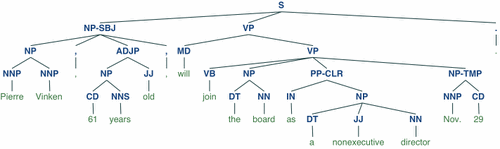
NB. If you publish work that uses NLTK, please cite the NLTK book as follows:
Bird, Steven, Edward Loper and Ewan Klein (2009), Natural Language Processing with Python. O’Reilly Media Inc.
- Wiki Crawling, requet() 시 주의사항
"""
    http://meta.wikimedia.org/wiki/Bot_policy#Unacceptable_usage

    Unacceptable usage
        Data retrieval: Bots may not be used to retrieve bulk content for any use
        not directly related to an approved bot task. This includes dynamically
        loading pages from another website, which may result in the website being
        blacklisted and permanently denied access. If you would like to download
        bulk content or mirror a project, please do so by downloading or hosting
        your own copy of our database.
"""
- h-recipe 란?
- 설명 및 latest version : http://microformats.org/wiki/h-recipe
- hRecipe ver0.22 : http://microformats.org/wiki/hrecipe